
Are accurate measurements and reliable data crucial to your project? Do you appreciate the ruggedness of Campbell Scientific gear? Do you like to be notified when new products or options become available? Whether you’re interested in our gear specifically or topics relevant to your projects, there are several ways you can stay informed with the latest news from Campbell Scientific, Inc. Keep reading to see what works best for you, find out how to manage your notifications, and let us know how we can improve.
#1 - Twitter, Facebook, LinkedIn, and YouTube
One way to stay up-to-date is to connect with us on social media. We regularly post updates on Twitter, Facebook, and LinkedIn.
- Are you on Twitter? Follow us at @CampbellSci. We’d be happy to hear from you.
- You may like us, but do you LIKE us? Connect with us on Facebook by liking the @campbellsci page and following us.
- Is LinkedIn more your style? Follow our Campbell Scientific, Inc. company page.
On Twitter, Facebook, and LinkedIn, we share informational updates on a variety of topics, including the following:
- Major product releases
- New case studies
- Training opportunities
- Software and operating system releases
- Press releases
- Industry conferences and trade shows
- Document releases, such as new technical papers
- Employment opportunities
- Office closures
But what about YouTube? We also have a corporate YouTube channel (Campbell Scientific, Inc.). Subscribe to it and watch our latest videos. (These videos are also posted on our Videos and Tutorials web page.)
#2 - Newsletter
Our online customer newsletter, Campbell Update, is published quarterly. Topics commonly covered include new and retired products, case studies, and company news.
Subscribing to our newsletter is easy. Just provide your email address on the Newsletter Subscription page, and click Update Subscription Status.
Tip: You can view past issues by accessing our online newsletter archive.
#3 - Blog
If you’re reading this blog article, we hope you’re subscribed to receive email notifications when new blog articles are posted that match your areas of interest.
To set up your blog subscription preferences, click Subscription Options in the blog menu on any blog page. Make your topic selections, provide your email address, and click Submit.
Tip: On any blog page, you can search for articles about a specific topic. Either make a selection from Blog Topics (menu items are expandable by clicking), or type a keyword in the Search the Blog box and click Search.
#4 - Email Subscriptions
Do you have a website account with Campbell Scientific, Inc.? You can easily manage your subscriptions to our website resources from the Your Account web page. Subscription options are listed below. To learn more about any of these options, click the link.
- Announcements (new products, trade shows, etc.)
- The Campbell Scientific Blog (new blog articles)
- User forum (You can unsubscribe from the forum or from individual posts using the Your Account web page. However, to subscribe to the forum or to individual posts, you will need to click to open a post from the User Forum web page.)
- IMAGINE educational grant
- Campbell Update newsletter
- Software and OS updates
- Training classes
- Videos and tutorials (The same videos that are posted on our YouTube channel are also posted on our website.)
So, how do you get to the Your Account web page? To access the summary of your subscriptions, you will need to log in to our website:
- Click Log In from the top menu bar on any page of our website:

- The Account Login page opens. Enter your email address and password.
- Click Log In.
- Click the Account drop-down menu (person icon) and then click Account Home:
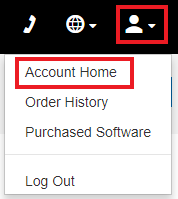
- The Your Account page opens.
- In the Subscription Settings section of the Account Menu, click Summary.:
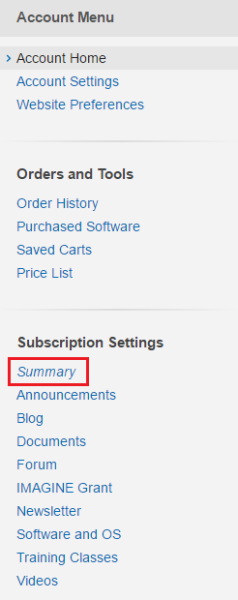
- You can view all the subscription options we offer, as well as your subscription status for each option. To change the status for an option, click the link in the Account Menu, and make your selections on the page.
By subscribing to any of these options, you will receive an email notification when new information, matching your preferences, is available.
| What if you don't have an account yet? If you don’t have an account on our website already, it’s easy to sign up for one. Just follow these steps:
|
Conclusion
We hope these options enable you to stay informed and get the updates you want from us, when you want them. Our goal is to provide you with information that you find interesting and helpful. Let us know how we’re doing by providing your suggestions and comments below.
Related Articles
Campbell Scientific Canada's Role in Hockey History
November 22, 2017
4 Ways You Can Stay Up-to-Date with Campbell Scientific, Inc.
Make sure you are getting the updates you want from us, when you want them.
November 16, 2017
4 Ways You Can Stay Up-to-Date with Campbell Scientific, Inc.
Make sure you are getting the updates you want from us, when you want them.
November 16, 2017
4 Ways You Can Stay Up-to-Date with Campbell Scientific, Inc.
Make sure you are getting the updates you want from us, when you want them.
November 16, 2017