We’ve recently had an exciting new addition to our family of LoggerNet datalogger support software. In this brief article, I’ll introduce you to this mobile app and tell you how you can get it free of charge.
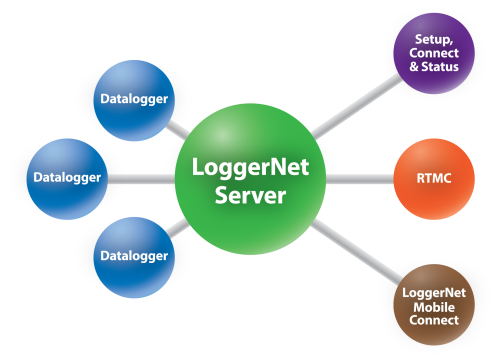
You are probably familiar with LoggerNet, our PC-based software product that is used to communicate with, program, and collect data from Campbell Scientific data loggers. LoggerNet consists of a software server that runs on a PC, as well as several "client" applications. The clients connect to the server, and the server, in turn, connects to the data loggers. Similarly, the data loggers connect to the server, and the server then sends the data logger messages to the clients.
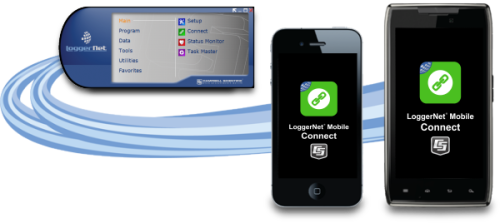
In mid-January, our newest LoggerNet family member arrived: LoggerNet Mobile Connect. LoggerNet Mobile Connect is a mobile app that runs on iOS or Android devices. The app connects to the LoggerNet server in a manner similar to any other LoggerNet client.
What does this mean for you?
With LoggerNet Mobile Connect, you can use a tablet or smartphone to connect to any LoggerNet server that is accessible via TCP/IP. That means that you can use your mobile device to connect to any Campbell Scientific data logger that the LoggerNet server can communicate with.
LoggerNet Mobile Connect includes the features most important to you when you’re away from your PC and need to check on the data loggers in your network. Using the mobile app you can do the following:
- View real-time data and stored data tables in a numeric or graphical format.
- Collect data from LoggerNet’s data cache, and store the data to a file on your mobile device.
- Use your mobile device to trigger a manual LoggerNet data collection from a data logger.
- Change the value of variables.
- Check important status information about LoggerNet and the health of your stations.
- Perform data logger maintenance, such as sending data logger programs, managing files, and setting a data logger clock.
Where can you get it?
LoggerNet Mobile Connect is available for iOS and Android devices. You can download the app free of charge from the Apple Store and Google Play.
What’s the fine print?
There are some compatibility requirements you should be aware of:
- LoggerNet Mobile Connect runs on iOS version 7.0 or later, and Android OS 4.0.3 or later.
- The app supports all Campbell Scientific data loggers. (For older mixed-array data loggers, some functionality is not supported.)
- LoggerNet Mobile Connect requires LoggerNet Admin version 4.0 or standard LoggerNet version 4.4.
Note: At the time of this post, the current shipping version of LoggerNet is 4.3. Within the next few months, we expect to ship LoggerNet 4.4. This upcoming version of LoggerNet will include a simple security model so that your LoggerNet server is protected from unintended access. (Currently, security is available only in LoggerNet Admin.)
- Keep in mind that your LoggerNet server must be accessible via TCP/IP from within the network over which you are trying to connect. This may require changes to firewall or other settings to allow outside access to the PC on which LoggerNet runs.
Try it now
We’re excited about this new addition to our LoggerNet family and hope you are too. Head on over to the Apple Store or Google Play to see screenshots, or to download the app and give it a try. If you think LoggerNet Mobile Connect will be useful for keeping an eye on your LoggerNet network, leave a comment and tell us about it.
Related Articles
Mobile App Joins the LoggerNet Family
Use your mobile device to connect to any Campbell Scientific datalogger that the LoggerNet server can communicate with.
February 3, 2016
Mobile App Joins the LoggerNet Family
Use your mobile device to connect to any Campbell Scientific datalogger that the LoggerNet server can communicate with.
February 3, 2016
Mobile App Joins the LoggerNet Family
Use your mobile device to connect to any Campbell Scientific datalogger that the LoggerNet server can communicate with.
February 3, 2016
Mobile App Joins the LoggerNet Family
Use your mobile device to connect to any Campbell Scientific data logger that the LoggerNet server can communicate with.
February 3, 2016