You can perform more complex scaling in an array without needing a For/Next loop. To take advantage of this feature, use OS 28 (CR6 OS 01) or later.
In this example program, a unique set of multipliers and offsets is applied to the column of an array:
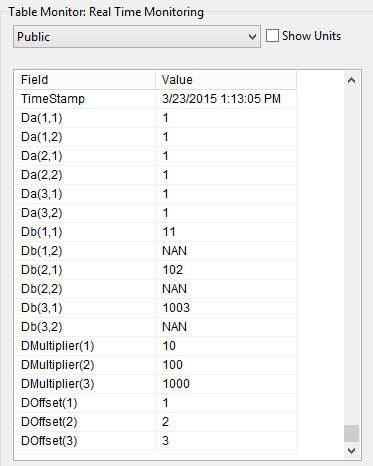
Public Da(3,2) = {1,1,1,1,1,1}'3 rows, 2 columns. All initialized = 1 Public Db(3,2) '3 rows, 2 columns Public DMultiplier(3) = {10,100,1000} Public DOffset(3) = {1,2,3} 'Main Program BeginProg Scan (1,Sec,0,0) 'scale the first column of Da 'by corresponding multiplier and offset 'store the results in the first column of Db Db(-1,1)() = Da(-1,1)() * DMultiplier() + DOffset() 'set second column of Db to NAN Db(-1,2)() = NAN NextScan EndProg This is what the results look like in the Connect Screen’s Table Monitor:
To use the new capability of OS 28 (CR6 OS 01) most effectively, there are some rules you should be aware of:
- An empty set of parentheses designates an array-assigned expression. For example, reference array() or array(A,B,C)().
- Only one dimension of the array is operated on at a time.
- To select the dimension to be operated on, negate the dimension of index of interest. For example, to operate on the dimension “B,” the syntax is array(A,-B,C).
Note: This new syntax does not affect how repetitions within instructions write to, or read from, variable arrays. To see how to use array notation and repetitions within measurement instructions, watch the “CRBasic | Advanced Programming” video.
Tip: After updating your operating system, it’s a good idea to check your existing programs to ensure they continue to run as expected.
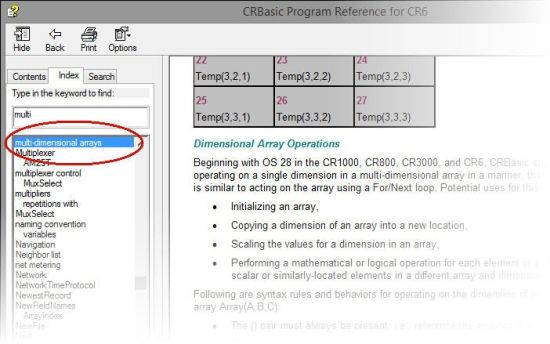
For more information about, and examples of, multi-dimensional arrays, we have several resources to help you. You can search for the section in your data logger manual titled “Array-Assigned Expression.” The CRBasic Editor Help application in LoggerNet is also a good resource. For example, search for “multi-dimensional arrays”:
| Recommended for You: To learn more about OS 28, review the “Powerful New Operating System for CR800, CR1000, CR3000” newsletter article. |
Campbell Scientific’s newest data logger operating system (OS 28 for the CR800, CR1000, and CR3000; OS 01 for the CR6 datalogger) enables you to use Array Notation in CRBasic multi-dimensional arrays in new ways. This article explored one of these methods—complex scaling. Two other methods, simple scaling and initializing multi-dimensional arrays were discussed in the first two articles in this series. One other method, copying or transposing, will be discussed in an article to follow.
Do you have comments or questions? Feel free to share them.