
Initializing variables within an array is more flexible than ever with OS 28 (CR6 OS 1). You can think of a single dimensioned array as numbers in a column. Two dimensions, in comparison, puts numbers in rows and columns. The third dimension is a page.
For example:
Public A(3) 'A(column) Public B(3,2) 'B(row, column) Public C(2,3,4) 'C(page, row, column) Not used in this example
Before the release of the new OS, you could initialize the variables as you declared them.
For example:
Public Ai(3) = {1,1,1} 'initialize single dimensioned array Public Bi(2,2) = {10,20,30,40} 'Bi(1,1)=10, Bi(1,2)=20 'Bi(2,1)=30, Bi(2,2)=40 To use the new capability of OS 28 (CR6 OS 01) most effectively, there are some rules you should understand:
- An empty set of parentheses designates an array-assigned expression. For example, reference array() or array(A,B,C)().
- Only one dimension of the array is operated on at a time.
- To select the dimension to be operated on, negate the dimension of index of interest. For example, to operate on the dimension “B,” the syntax is array(A,-B,C).
The example program below initializes the variables A(3) and B(3,2) as declared above:
'Main Program BeginProg Scan (1,Sec,0,0) A()=1 ' all values = 1 'Initialize B(3,2) as follows: '100 100 '200 300 '200 300 B(1,-1)() = 100 'set B(1,1) and B(1,2) to 100 B(-2,1)() = 200 'set B(2,1) and B(3,1) to 200 B(-2,2)() = 300 'set B(2,2) and B(3,2) to 300 NextScan EndProg
Note: This new syntax does not affect how repetitions within instructions write to, or read from, variable arrays. To see how to use array notation and repetitions within measurement instructions, watch the CRBasic | Advanced Programming video.
Tip: After updating your operating system, it’s a good idea to check your existing programs to ensure they continue to run as expected.
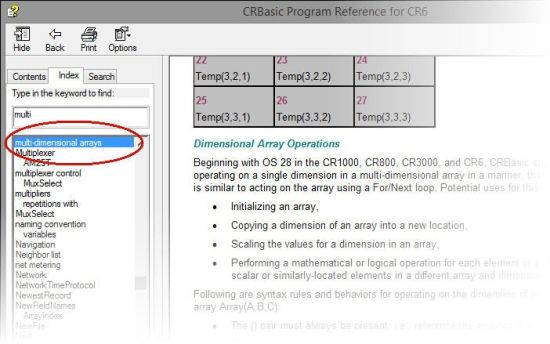
For more information about, and examples of, multi-dimensional arrays, we have several resources to help you. You can search for the section in your data logger manual titled “Array-Assigned Expression.” The CRBasic Editor Help application in LoggerNet is also a good resource. For example, search for “multi-dimensional arrays”:
| Recommended for You: To learn more about OS 28, review the “Powerful New Operating System for CR800, CR1000, CR3000” newsletter article. |
Campbell Scientific’s newest data logger operating system (OS 28 for the CR800, CR1000, and CR3000; OS 01 for the CR6 datalogger) enables you to use Array Notation in CRBasic multi-dimensional arrays in new ways. This article explored one of these methods—initializing multi-dimensional arrays. Another method, simple scaling, was discussed in the first article in this series. Two other methods, complex scaling and copying or transposing, will be discussed in articles to follow.
Do you have comments or questions? Feel free to share them.