Videos and Tutorials
15 results for "CR1000X"

Built-in Web Interface
March 14, 2025 (6:15)
The CR6, CR1000X, and CR300-series dataloggers feature an embedded web interface allowing access to real-time and stored data. Additionally, you can change settings and collect data.

Replacing the CR1000X Lithium Battery
April 17, 2024 (5:58)
This video demonstrates how to safely disassemble the CR1000X, change its lithium battery and then reassemble and restore a backup file of the data loggers settings and program. See the Backing Up And Restoring Data Logger Settings video (h
Documenting Data Logger Wiring Using an Excel Template
March 22, 2024 (5:41)
This video demonstrates how to create a wiring diagram for a data logger system using a spreadsheet. The spreadsheet contains tabs featuring images of the wiring panels for the CR1000X, CR6, CR300, CR310, and CR350 dataloggers. Employing a
IP Networking and Data Loggers Part 2
April 29, 2022 (9:51)
Campbell Scientific data loggers provide flexible IP connectivity solutions to meet data acquisition needs. Data loggers can be ordered with IP communication options built in, or external Ethernet interfaces may be added. In Part 1 of this
IP Networking and Data Loggers Part 1
April 29, 2022 (8:34)
Campbell Scientific data loggers provide flexible IP connectivity solutions to meet data acquisition needs. Data loggers can be ordered with IP communication options built in, or external Ethernet interfaces may be added. In Part 1 of this
Empezar CR1000X (Spanish) | Envio de programa, Descarga y Monitorizacion de datos (Parte 4/4)
September 8, 2017 (5:20)
Use the LoggerNet Connect Screen to send a program, view real-time measurements, and collect data. Use View Pro to display collected data.
Empezar CR1000X (Spanish) | Programacion (Parte 3/4)
September 8, 2017 (8:11)
Create a CR1000X program using the Short Cut program generator. Wire your sensor accordingly. A type T thermocouple is used as an example.
Empezar CR1000X (Spanish) | Comunicacion (Parte 2/4)
September 7, 2017 (7:36)
Install the USB driver for the CR1000X then connect it to your computer. Once connected you’ll set the CR1000X's clock and view the Getting Started program's real-time measurements. Uses EZ Setup and follows the Getting Started section of t

Empezar CR1000X (Spanish) | Introduccion (Parte 1/4)
September 7, 2017 (2:30)
Get started with a new CR1000X by following along with this 4-part tutorial series or the Get Started section of the CR1000X online help. Let’s get started by unpacking the CR1000X and looking at what else is in the box.
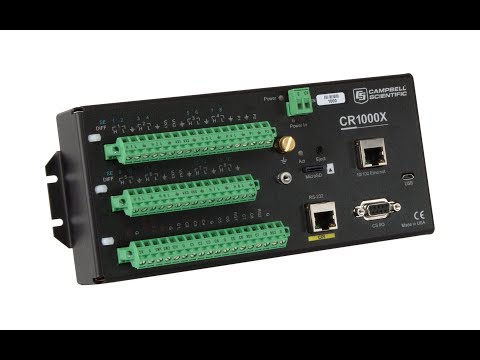
New CR1000X Datalogger
August 3, 2017 (2:26)
The CR1000X Measurement and Control Datalogger provides an embedded, browser-based user interface for quick and easy data and system interrogation from any IP device. This includes connections directly with USB or Ethernet, and wireless dev
CR1000X Series Getting Started
August 1, 2017
Learn how to get up and running with your CR1000X Series data logger. This tutorial includes links to our new online help system (check out its awesome search feature), four new videos, and a first glimpse of the updated Short Cut Program G
CR1000X Datalogger Getting Started | Data (Part 4)
July 31, 2017 (4:05)
Use the LoggerNet Connect Screen to send a program, view real-time measurements, and collect data. Use View Pro to display collected data.

CR1000X Datalogger Getting Started | Program (Part 3)
July 31, 2017 (6:25)
Create a CR1000X program using the Short Cut program generator. Wire your sensor accordingly. A type T thermocouple is used as an example.

CR1000X Datalogger Getting Started | Communicate (Part 2)
July 30, 2017 (6:08)
Install the USB driver for the CR1000X then connect it to your computer. Once connected you’ll set the CR1000X's clock and view the Getting Started program's real-time measurements. Uses EZ Setup and follows the Getting Started section of t

CR1000X Datalogger Getting Started | Overview (Part 1)
July 29, 2017 (2:21)
Get started with a new CR1000X by following along with this 4-part tutorial series or the Get Started section of the CR1000X online help. Let’s get started by unpacking the CR1000X and looking at what else is in the box.