LNDB
LNDB
OrderableConfigurableLoggerNet Database Software
Pricing
- Model:
- LNDB
- Item Number:
- 31028
- Warranty:
- 90 days
- Lead time:
- 21 days
Overview
LoggerNet DB (LNDB) is ideally suited for transitioning data from LoggerNet’s data cache to a relational database of your choice. Publishing user-selected LoggerNet collected data to these relational databases enables data administrators to share their data with a large customer base across various platforms and methods. Those platforms could include custom websites (including those developed with RTMC and CSIWEBS), custom data reporting systems, data warehousing, and customer software (web and desktop) applications. This application is for data network administrators that want to push their valuable LoggerNet data into relational databases and have that data published in real time (as often as the data is collected).
The low-cost LNDB software is simple to set up and administer and gives you the flexibility you need for your organization. Most users can have the software installed and LoggerNet data uploading to their relational database in less than 20 minutes' time (assuming the database and LoggerNet are set up and proper credentials are issued to the data manager). After setup, LNDB runs as a service on Windows and continues to reliably push LoggerNet data to the relational database, allowing you to focus your time and energy on other projects.
Key Advantages
Push data from LoggerNet data cache to relational databases
Technical Description
LNDB can be run as a service on the workstation or server. This ensures that when the computer is restarted, LNDB is automatically started without human intervention. This allows data ingestion from LoggerNet to the relational database to continue after unforeseen power issues or automatic operating system updates.
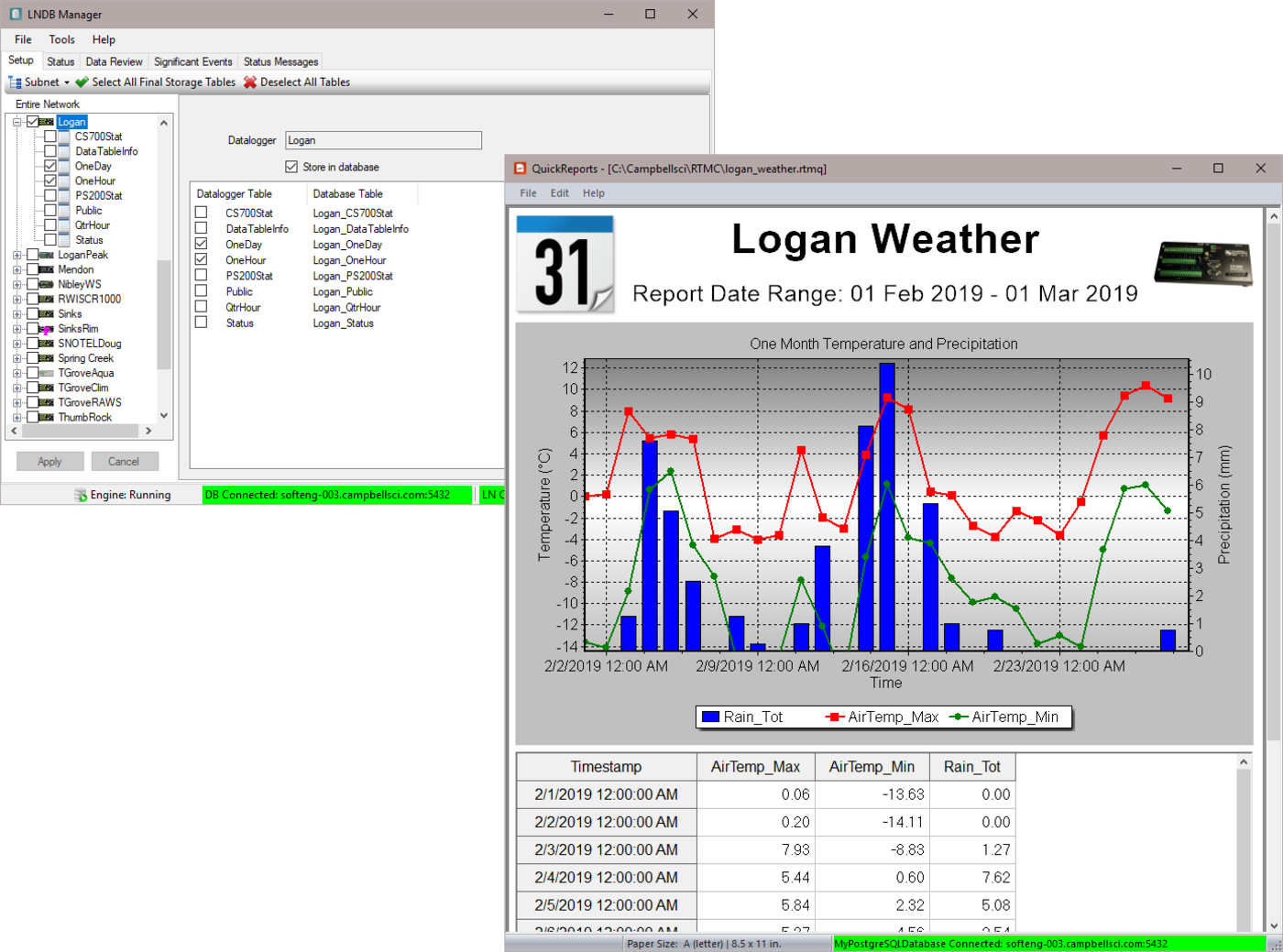
LNDB Manager is the main client screen used to configure the LNDB engine. It is used to determine which LoggerNet system to connect to and which database is used. LNDB Manager can also be used to watch the status of various data collections and data push events. Data can be reviewed in tabular columns directly from the database without having to use database-specific tools. Status messages and Significant Events can be viewed using LNDB Manager as well.
DBExport is a database client that can be used to retrieve data directly from the relational dabase. Users can pull all the data from the database or select data using data ranges. EDExport also has the ability to check for and inform the user of missing records for the exported data. Exported file formats include TOA5, TOACI1, TOB1, CSIXML, and Custom CSV.
DBImport is a database client that can be used to import data from existing data files. The user can ingest the data into an existing table or create a new one in the database. These data files can be either those created by LoggerNet or database files from other sources or data loggers.
QuickReports is another database client that can be used to generate simple reports and graphs with data from the relational database.
Benefits
- Reliably moves data from user-selected LoggerNet data caches into tables in a relational database
- Can be used to import data from user-created data files into a relational database table
- Exports data from a database table into a data file
- Includes QuickReports application to design simple report from an LNDB database
- Allows users to review database data in real time
- Monitors the LNDB data ingestion engine
- Simple to set up and easy to use
- Saves data managers money by not having to hire a database administrator and a custom software developer
Specifications
- Operating System
- Windows 11 or 10 and Windows Server versions 2012 R2, 2016, or 2019.
(Users using Windows Server with security policies other than the default policies will need to work with their IT administrations to resolve any security issues.)
- Required Framework
- This software requires the Microsoft .NET 4.6.2 (or better) Framework to run properly.
To use the reporting functions of LNDB 2.0, Microsoft .NET Framework 3.5 also needs to be installed. If the required version of the .NET framework is not already installed on your computer, it can be obtained from the Microsoft Download Center.
Related Resources
Case Studies

Documents
- Manual
LNDB Product Manual (online)
December 2024
View Document - Technical Paper
Installing and Configuring MySQL for Use with LNDB
March 2026
View Document - Technical Paper
Installing and Configuring PostgreSQL for Use with LNDB
March 2026
View Document - Manual
LNDB LoggerNet Database Software
December 2024
View Document - View all documents