PC400
PC400
OrderableDatalogger Support Software
Basic data logger support software.
Overview
PC400 is Campbell Scientific's free entry-level data logger support software. This versatile software supports a variety of telecommunication options, manual data collection, and data display. PC400 includes an easy-to-use program generator (Short Cut), as well as full-featured program editors (CRBasic, Edlog).
Key Advantages
Powerful tools and editors
Technical Description
EZSetup Wizard
To facilitate station setup, PC400 provides the EZSetup Wizard. This simple, station-oriented wizard walks the user through the setup process. The wizard can also be used to modify settings for an existing site.
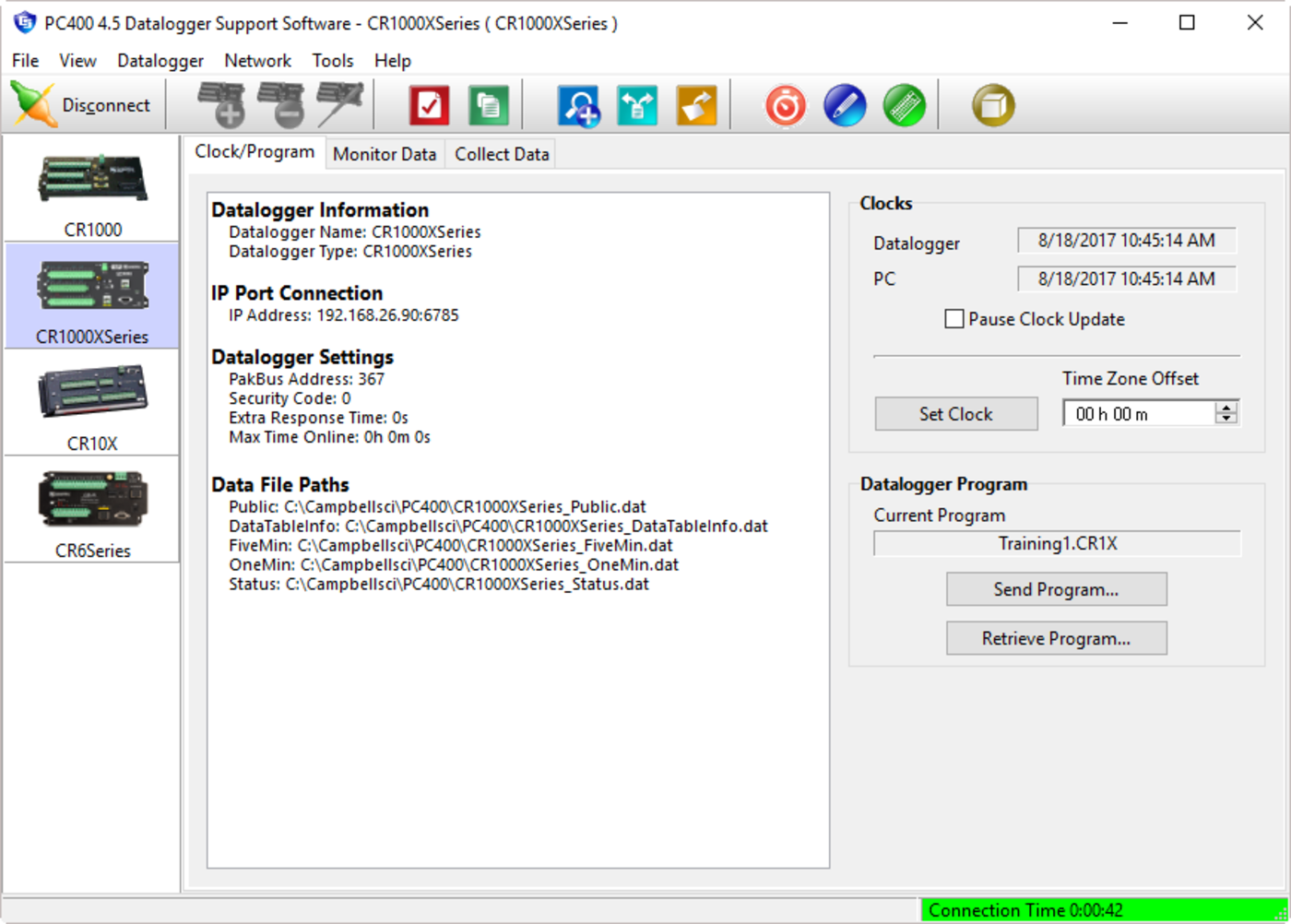
Clock/Program, Monitor Data, Collect Data
These tools allow customers to set/edit the station’s settings, set the data logger’s clock, view real-time data, set flags/ports, and collect data on demand. Communication links supported include direct connect, phone modems, Ethernet, narrow-band UHF and VHF radios, spread-spectrum radios, or multidrop modems.
Programming
PC400 offers two full-featured programming tools—the CRBasic Editor and Edlog. The CRBasic Editor (similar in syntax to the BASIC programming language) supports our newer data loggers. Edlog supports our retired data loggers and the CR7.
For those who prefer a simpler means of programming their data loggers, PC400 includes Short Cut for Windows (SCWin). SCWin provides a wizard-like interface for generating programs for Campbell Scientific data loggers and supports all our popular sensors, as well as user-created custom sensor files (using an existing sensor file as the starting point). Short Cut can also be used for the ET107, ET106, and MetData1 Weather Stations.
View Pro
View Pro allows data to be viewed in numeric format or in one of several graphical layouts, including a line graph, xy plot, histogram, rainflow, and 2D/3D FFTs. Multiple data files can be opened at once, allowing side-by-side comparison of the data. There is no limit to the number of traces that can be displayed on a graph. The graphs can be saved in a variety of formats. The left and right y-axes of the graphs can be configured independently.
Device Configuration Utility
DevConfig allows you to send new operating systems to data loggers and other devices with flash memory, configure various PakBus settings in data loggers, and edit settings for communication peripherals such as the NL241, NL240, RF407, and RF401A. The latest DevConfig can be downloaded from our website.
Card Convert
CardConvert is used to convert and save binary data from a PC Card, CompactFlash card, or microSD card. PC Cards are compatible with our CR5000 and CR9000X dataloggers. CompactFlash cards are compatible with our CR1000, CR3000, CR5000, and CR9000X dataloggers. MicroSD cards are compatible with our CR6 and CR1000X dataloggers.
Split
Split is used to post-process data files and create reports. It sorts and combines data based on time or conditions, performs calculations on data values, converts “Day of Year” calendar dates into more traditional date/time stamps, and allows variable column widths for printable reports.
License for Use
PC400 is copyrighted software. Campbell Scientific distributes this software free of charge to enable users to work with Campbell Scientific data acquisition equipment. PC400 nor any of its files may be sold or included in any other software or altered in any way without prior permission from Campbell Scientific, Inc.
Limited Warranty
Campbell Scientific, Inc., does not warrant that the software will meet licensee’s requirements or that the software or documentation are error free or that the operation of the software will be uninterrupted. Campbell Scientific, Inc., is not responsible for problems caused by computer hardware, computer operating systems or the use of Campbell Scientific, Inc.’s software with non-Campbell Scientific, Inc. software.
All warranties of merchantability and fitness for a particular purpose are disclaimed and excluded. Campbell Scientific, Inc., shall not in any case be liable for special, incidental, consequential, indirect, or other similar damages even if Campbell Scientific, Inc., has been advised of the possibility of such damages.
Campbell Scientific, Inc., is not responsible for any costs incurred as result of lost profits or revenue, loss of use of the software, loss of data, cost of re-creating lost data, the cost of any substitute program, claims by any party other than licensee, or for other similar costs.
Licensee’s sole and exclusive remedy is set forth in this limited warranty. Campbell Scientific, Inc.’s aggregate liability arising from, or relating to, this agreement or the software or documentation (regardless of the form of action; e.g., contract, tort, computer malpractice, fraud and/or otherwise) is limited to the purchase price paid by the licensee.
Benefits
- EZSetup Wizard for easier station setup
- ShortCut, Edlog, and CRBasic programming tools used to create/edit data logger programs that measure sensors and control SDM devices, multiplexers, and relays
- Data retrieval via direct connect, phone modems, Ethernet, radios (UHF, VHF, or spread spectrum), or multidrop modems
- Real-time or historic data displays
- Time-series graphs for unlimited elements from a data file
- Troubleshooting tools (terminal emulator and communications log)
- Device Configuration Utility for setting up Campbell Scientific hardware
- Now works with the <a href="pbrouter">PakBus Routing Service</a>
Specifications
- Operating System
- Windows 11 or 10
- Requirement
- TCP/IP services must be installed and enabled on the PC.
- Purchased Separately
- Yes
- Software Level
- Entry to intermediate
- Communications Supported
- Direct connect, Ethernet, short-haul, phone modems (land-line, cellular, voice synthesized), RF transceivers (UHF, VHF, and spread spectrum), multidrop modems
- Scheduled Data Collection Supported
- No
- Data Display Supported
- Numeric, simple, line graph
Accessories
(1)
Related Resources
Case Studies

Documents
Videos and Tutorials

CRBasic | Help System
December 16, 2013 (3:30)
The help system within LoggerNet's CRBasic programming language
Watch
CRBasic | Advanced Programming
July 30, 2014 (6:50)
Programming multiple measurements of the same type
WatchCR300 Series Wi-Fi QuickStart
February 3, 2017
WatchCollect Data Tutorial
July 20, 2016
Watch- View all videos and tutorials