We all know that Campbell Scientific dataloggers are really good at taking measurements and storing data. But did you know that they can also make decisions and control other devices? Often, device control is done based on a time interval. This article briefly illustrates how you can set time intervals using the TimeIsBetween() and TimeIntoInterval() instructions.
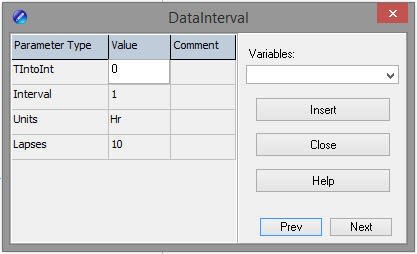
As a CRBasic programmer, you may already be using the DataInterval() instruction to store data on a specific interval, such as every hour at the top of the hour, like this:
Other things, besides storing data, can be done on an interval. For example, you can use the TimeIsBetween() instruction or the TimeIntoInterval() instruction within a logic statement to turn a device on or off, take a measurement, or perform a calculation.
Both instructions return the values of TRUE or FALSE depending on the datalogger’s real-time clock.
- Use the TimeIsBetween() instruction to determine if the datalogger's real-time clock falls within a range of time. If so, the instruction returns TRUE. The instruction returns TRUE for the entire interval specified.
- Use the TimeIntoInterval() instruction to determine if the datalogger’s real-time clock matches the time specified in the program at the start of a scan. If so, the instruction returns TRUE. The instruction only returns TRUE for the one scan that matches the interval specified.
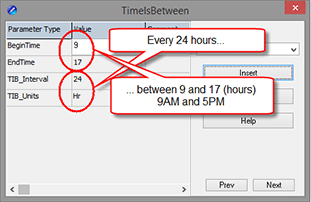 | 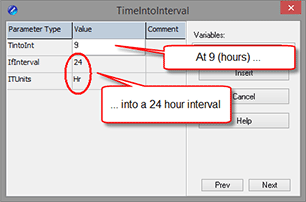 | |
| In this example, a modem is set to turn on between the hours of 9:00 a.m. and 5:00 p.m. | In this example, a modem is set to turn on at 9:00 a.m. and turn off at 5:00 p.m. |
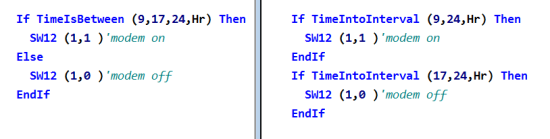
Tip: Notice that in both programs, when you turn a device on, you also need to turn the device off. If you try to rely on a condition being FALSE to turn off a device, the FALSE condition will not change the state of the port, and your device will remain turned on.
The nuances between the two programs above matter the most if your program misses an exact time. In this first instance, because the program is sent at 8:20 a.m. (prior to the 9:00 a.m. start time), both instructions return TRUE at 9 a.m. and remain TRUE until 5 p.m.
| TimeIsBetween() Modem | TimeIntoInterval() Modem | |
| 8:00 AM | Off | Off |
| 8:20 AM send program | Off | Off |
| 9:00 AM | On | On |
| ... | On | On |
| 5:00 PM | Off | Off |
In this second instance, because the program is sent at 9:20 a.m. (after the 9:00 a.m. start time), the first scan returns FALSE for the TimeIntoInterval() instruction, and the instruction remains FALSE until 9:00 a.m. the next day.
| TimeIsBetween() Modem | TimeIntoInterval() Modem | |
| 8:00 AM | Off | Off |
| 9:00 AM | On | On |
| 9:20 AM send program | On | Off |
| 10:00 AM | On | Off |
| ... | On | Off |
| 5:00 PM | Off | Off |
Note: The TimeIsBetween() instruction was introduced with the release of OS 28 for the CR3000, CR1000, and CR800-series dataloggers, and with the release of OS 01 for the CR6.
| Recommended for You: For more information about the TimeIsBetween() instruction, read the “Tips and Tricks: More Decisions, Decisions, Decisions…” newsletter article. |
How have you used the TimeIsBetween() and TimeIntoInterval() instructions in your CRBasic programs? Share your story below.