CRBasic has a full menu of instructions to help you write or edit your data logger program. This article offers a main course of scheduling your data logger actions using the RealTime() instruction with a side dish of making your program easier to read with Alias declarations.
The RealTime() Instruction
The RealTime() instruction acquires the year, month, day, hour, minute, second, microsecond, day of week, and day of year from the data logger clock and stores the results in an array. This is useful if you want to schedule the data logger to perform an action at particular intervals or on particular days. For example, you can use the RealTime() instruction to schedule an action every Tuesday or once a month.
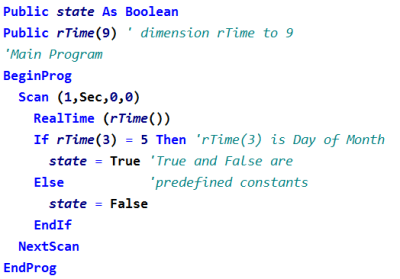
In the RealTime() instruction example below, a Boolean variable is set to "True" on the fifth day of every month. You might use this to test an alarm or run a calibration routine.
Alias Declarations
In the above example, did you notice the instruction “If rTime(3) = 5 Then state = True”? This instruction would be more readable as "If Day of Month (DOM) is True.” You can use the Alias declaration to assign the second name of “DOM” to “rTime(3)” like this:
- Alias rTime(3) = DOM
Now, in the above example, we can use "If DOM = 5 Then state = True."
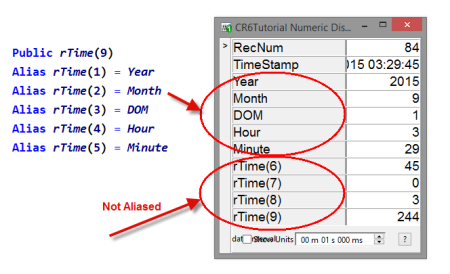
Alias declarations are particularly useful when using arrays, such as with the RealTime() instruction, so you can easily identify individual variables using unique names.
A Helpful Resource
Did you know that you can copy and paste the Alias declarations for the RealTime() instruction from the RealTime Example in the CRBasic Editor Help? Follow these steps to access this resource:
- Highlight RealTime in the instruction list of the CRBasic Editor.
- Click the Help button above the instruction list.
- In the window that opens, click the Example link, which opens a smaller window with an example program that uses the Alias declarations.
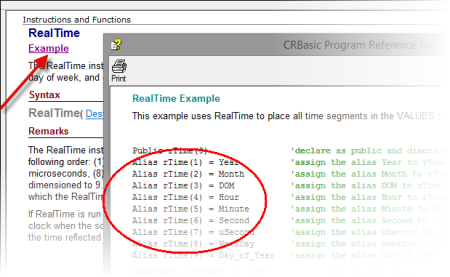
- Highlight and copy (Ctrl+C) the applicable Alias declarations, and paste (Ctrl+V) them into your program.
| Recommended for You: For more information about variable arrays and Alias declarations, watch the ”CRBasic | Advanced Programming” video. |
Hungry for more information about the RealTime() instruction or Alias declarations? Post your comment or question below.